Service / Support
Warranty and post-warranty repairs. Like any electronic device, our controller may occasionally develop a fault. In most cases, it can be repaired without the need to purchase a new unit. Simply send it to our service center via Packeta, where we will collect it. If the device is still under warranty, we will repair it as quickly as possible and return it to you free of charge.
```Service Request
Before sending your controller for repair, please make sure it is running the latest firmware version. The current version is 1.1.9 (2026-10-04). The installed firmware version is displayed during system startup or can be found in the system settings under System Overview.
If your version is older, connect the device to a Wi-Fi network and restart it. The controller will automatically check for a newer firmware version and perform an update if necessary.
If the issue persists even after updating, please describe in the form how and when the fault occurs. We will work with you to resolve the problem as quickly as possible.
If the problem turns out to be hardware-related, pack the controller securely and we will provide you with a shipping code for your nearest Packeta drop-off point. Once repaired, the unit will be returned to you with shipment notification. For out-of-warranty repairs, we will first provide a repair cost estimate and proceed only after receiving your approval.
Please package the device carefully to prevent damage during transport. After submitting the form, you will receive a shipping code. Provide this code when handing over the parcel at a Packeta pickup point or enter it directly on a Packeta Box keypad. From there, we will take care of the rest.
Firmware 1.1.9 | 20261004
Minor fixes and improvements. Updated the time synchronization function after device startup and improved MQTT communication for configuring the unit to start based on daylight level.
Firmware 1.1.8 | 20260928
Fixed automatic reconnection after loss of internet connectivity.
Firmware 1.1.7 | 20260901
Minor improvements to the MQTT client and a fix to the time update function.
Firmware 1.1.6 | 20260901
Significant changes to the export and import of values used for communication with the mobile app.
Firmware 1.1.5 | 20260830
Fixed several minor software issues. Added a night display sleep option that turns off the display backlight after the configured end-of-day time. During the day, the backlight remains on. The displayed values remain visible even when the backlight is turned off. In AUTO mode, after the daily cycle or heating is completed, the last known pool temperature remains displayed until the pump is started again. If OTA updates are enabled, they are always performed at night. Fixed the function for connecting the device to a Wi-Fi network.
Firmware 1.1.4 | 20260624
Added support for manual sensor calibration when using extension cables or longer wiring. Added Wi-Fi diagnostics to display RSSI signal strength and Wi-Fi channel number. Added display of the device MAC address.The I2C bus speed has been adjusted to reduce interference. MQTT connection messages during startup have been removed and replaced with LED status indication. Firmware version checking during startup has also been removed.Fixed exiting the System Overview menu. MQTT functionality has been improved. If firmware version checking is enabled, update checks are now performed automatically during nighttime hours when the unit is idle and not executing any tasks. Once a new firmware version is available, the update process will be initiated automatically.
Firmware 1.1.3 | 20260604
Reduced I2C bus speed to minimize random LCD character corruption. Fixed MQTT status display during initialization and made minor menu improvements.
Firmware 1.1.2 | 20260530
Fixed several significant issues. When switching to RCHK mode, the pool circuit measurement was not performed, making it impossible to determine the current pool temperature.
Firmware 1.1.1 | 20260525
Initial release of the control software with all core features, including Wi-Fi connectivity, MQTT communication, and OTA updates. It is not perfect yet, and during normal operation it will continue to be refined and improved. Thanks to OTA firmware updates, upgrading the device is quick and easy.
It is not necessary; the device can be used without the filtration bypass. However, it is better to manually switch the filtration to circulation mode to prevent water pressure from decreasing due to passing through the filter, which would otherwise increase the load on the circulation motor.
Připojení dodávaných ventilů
Z výroby jsou jednotky SUNREG připraveny na připojení ventilů se schematem zapojení CR303. Napájení motorického ventilu DC 12V, třívodičově.Ventil je napájen z vnitřního transformátoru AC 230V/DC 12V a pro ovládání se používá CMOS tranzistor 1A.
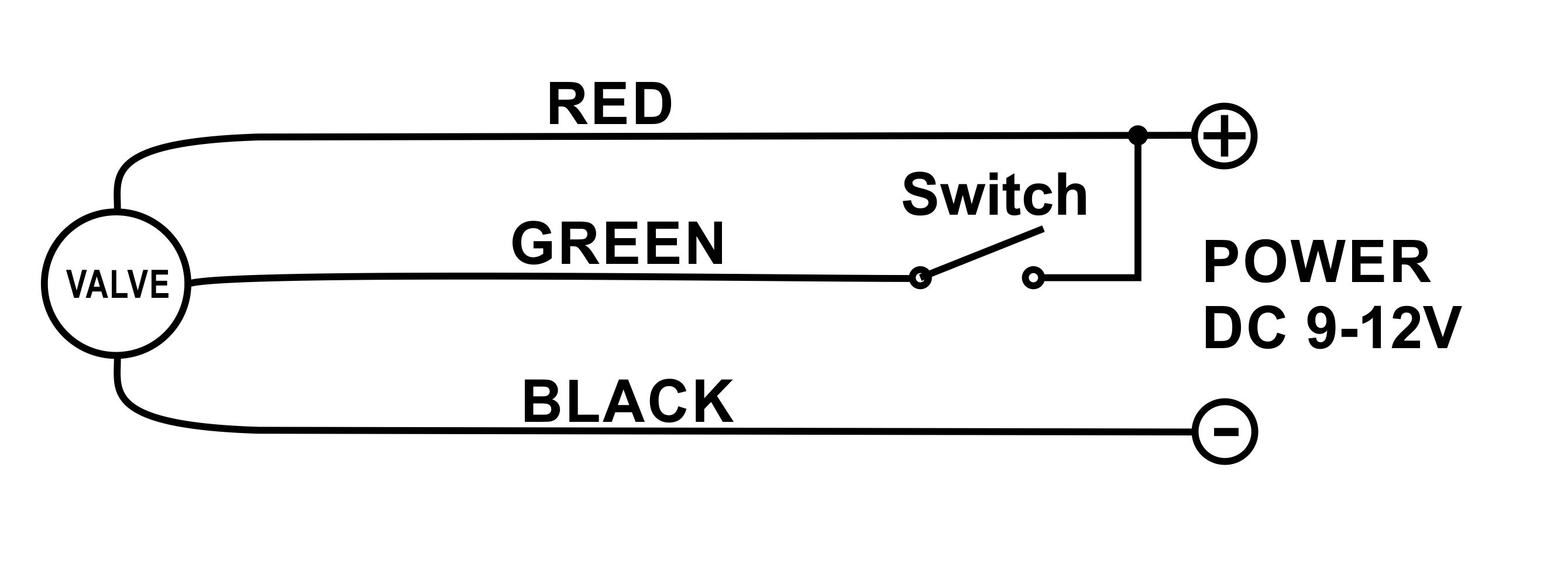
Schema připojení námi dodávaných ventilů. Zapojení CR303/NC (Ventil normálně uzavřen)Připojení RD(červený) a GR(zelený) pozitivní napájecí napětí, BK(černý) negativní. Pokud je SW (spínač) uzavřen (na GR je připojen kladný pól napájení) ventil je otevřen, pokud je SW otevřen, ventil je uzavřen. Motor automaticky vypne přívod po dosažení otevřené nebo uzavřené polohy ventilu. Po odpojení napětí je možné ventil nouzově ovládat ručně, povytažením otočného knoflíku a jeho otáčením do zvolené polohy. K určení stavu ventilu slouží indikátor na horní straně ventilu.
V případě potřeby ovládání jiných ventilů na jiné napájení je možné využít výstup pro spínání externího relé ke kterému je ovšem nutné připojit ochrannu diodu!!!
Nastavení řídící jednotky

Aplikace pro řídící jednotku SUNREG-Wi
Je ke stažení na oblíbených platformách.